The Midnight Struggle With Endless Support Tickets
Ever hit the refresh button on your support inbox and watched 50 new emails pop up out of nowhere? Yeah, I have been there too. You end up copying and pasting the same "Here is your tracking link" reply until your eyes blur. Let's fix that messy inbox today, and I promise we will do it without making your business sound like a soulless robot.
I wanted to give every single person a thoughtful, helpful reply. But as a human being, I only had so much energy. I was manually copying and pasting responses, trying my best not to make a mistake. It felt like I was using a tiny bucket to empty an ocean of water.
Every time I cleared ten emails, twenty more would pop up. My stress levels were through the roof. I started snapping at my friends and family because my mind was always stuck in that endless loop of customer complaints. I felt completely trapped by my own business.
What You Will Learn Today (Quick Wins):
- How to stop copying and pasting the exact same emails every day.
- The easy trick to auto-sort urgent refund requests from basic questions.
- Why making your automated assistant sound like a real human changes everything.
- How to tag in a human worker before an angry customer leaves a bad review.
How Manual Repetitive Tasks Destroy Mental Peace
If you run a business, manage a team, or work in customer service, you probably know this exact feeling. Dealing with routine questions takes away your most valuable asset: your time. When you spend your whole day doing robotic tasks, you lose the ability to actually connect with your customers.
This constant pressure slowly destroys your mental peace. You stop enjoying your work. Instead of coming up with creative ideas to grow your business, you become a full-time problem solver for minor issues. The stress builds up, leading to severe burnout.
Your customers suffer too. When they ask a simple question, they expect a quick answer. If they have to wait two days just to learn how to return a product, they get angry. That anger turns into bad reviews, which causes you even more stress.

Finding A Smarter Way To Handle The Daily Grind
After hitting rock bottom with my own inbox, I realized something had to change. I could not just hire twenty people to answer emails. I needed a system that could think for itself, or at least handle the heavy lifting. That is when I started exploring how smart algorithms actually work in everyday situations.
The core idea is incredibly simple. You teach a computer system to recognize patterns in the messages you receive every day. Once the system learns these patterns, it can take over the boring parts of your job.
Organizing The Chaos With Smart Ticket Sorting
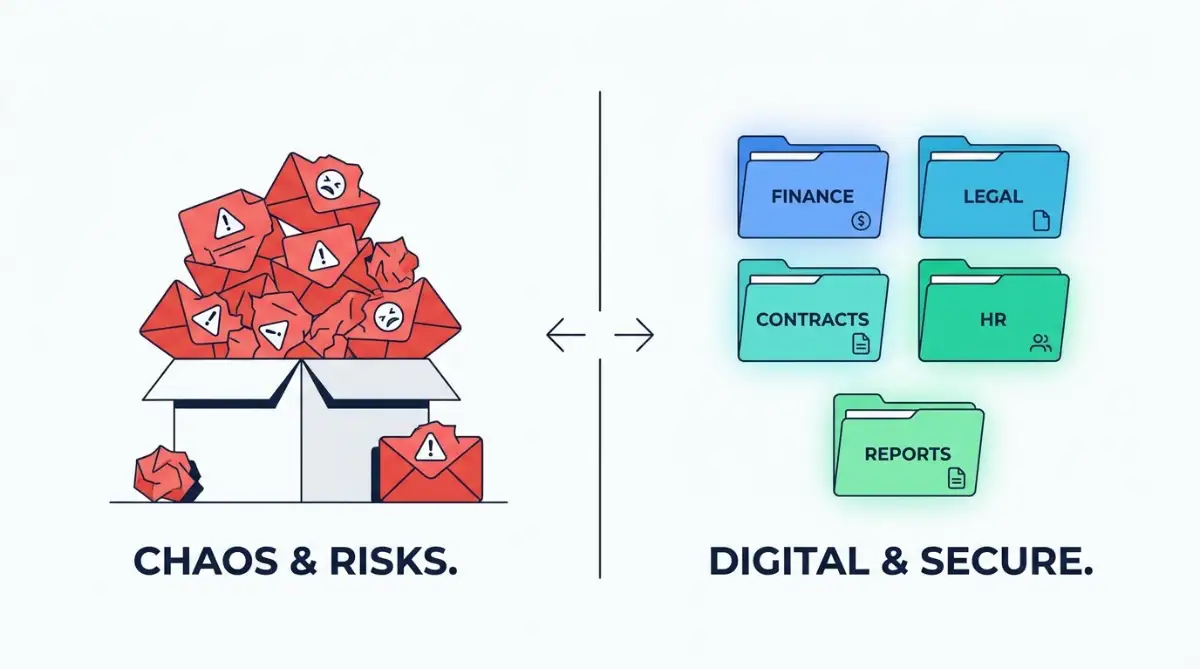
Imagine walking into a massive post office where millions of letters are dumped into one giant pile. If human workers had to read every single envelope to decide where it goes, it would take months. That is exactly what a disorganized support inbox looks like.
When you use smart technology to read incoming messages, everything changes. The system scans the text in a fraction of a second. It immediately knows if the customer is asking about a refund, reporting a technical bug, or just saying thank you.
Instead of you manually reading and sorting these emails, the system does it instantly. It puts the refund requests in one folder. It sends the complicated technical bugs straight to your IT experts.
Quick Reality Check: Manual vs. Smart Sorting
| What You Do | Manual Inbox | Smart Inbox |
| :--- | :--- | :--- |
| Finding Urgent Tickets | Takes 15+ minutes | Happens instantly |
| Sorting by Topic | 100% human brainpower | Auto-tagged by the system |
| Stress Level | Through the roof | Way more manageable |
See the difference? You are basically buying back your own time.
Why Instant Sorting Matters So Much
This might sound like a small change, but it completely transforms your workday. You no longer have to dig through a messy inbox to find the important messages. The most urgent problems are already waiting for you at the very top.
For example, if a high-paying client is experiencing a major software crash, you need to know about it right away. A smart sorting tool flags that message with a bright red priority tag. Meanwhile, the fifty people asking about business hours are neatly organized out of your way.
This method removes a huge amount of mental friction. You can sit down at your desk, drink your coffee in peace, and focus only on the issues that actually require human brainpower.
My Personal Lesson On Setting Things Up
I used to think that setting up automated responses meant I had to sound like a boring robot. I was terrified that my customers would think I did not care about them anymore. I spent weeks trying to write the "perfect" robotic script.
What I quickly realized is that customers do not care if a machine answers them, as long as the answer is fast and actually solves their problem. I started writing my automated replies exactly how I speak in real life. I used friendly greetings, simple words, and a helpful tone. The results were amazing. People were just happy to get an instant solution.
For example, instead of a dry, robotic message, I use a simple template that sounds just like me:
Bad AI: "Query received. Ticket #4992 will be processed in 48 hours."
My Smart Reply: "Hey there! Got your message. I am looking into this right now and will get back to you with a real answer by tomorrow morning. Hang tight!"
Notice the shift? It buys me time, but the customer still feels heard.
Watch This Quick Breakdown To See Exactly How These Smart Tools Work Behind The Scenes.
[Insert YouTube Video Link Here]
Understanding Customer Mood Without Reading A Word
One of the most fascinating things these smart systems can do is read emotions. We call this sentiment analysis. It sounds like science fiction, but it is a very practical tool that you can use right now.
When a customer writes an email in all capital letters with lots of exclamation marks, a human instantly knows they are angry. But what if you have a thousand unread emails? You cannot spot the angry ones until you open them.
An intelligent algorithm can scan every incoming message and detect the emotional tone behind the words. It looks for negative phrases, signs of frustration, and urgent demands.
Turning Angry Customers Into Loyal Fans
Once the system identifies a highly frustrated customer, it takes immediate action. It pulls that ticket out of the regular waiting line and pushes it straight to a senior manager.
This means you can calm down an upset customer before they completely lose their patience. Instead of them waiting three days and leaving a terrible review, you call them within ten minutes. That level of speed turns a potential disaster into a massive win.
I have seen customers go from furious to incredibly thankful just because someone noticed their frustration right away. This is how you build deep loyalty. You use technology to be more human, not less.
The Truth About Chatbots And Customer Happiness
Let us talk about a very common fear. Many business owners hate the idea of chatbots. They remember the old, clunky pop-up windows from ten years ago that never understood what you were saying.
We need to clear up some myths right now. The technology we use today is completely different. Modern smart assistants do not just match keywords; they understand the meaning behind the entire sentence.
How Smart Assistants Handle The Night Shift
Think of a modern automated assistant as your most dedicated employee. They never sleep, they never take a coffee break, and they never get annoyed by repetitive questions.
When a customer from the other side of the world visits your website at 2 AM, they do not want to wait for your office to open. They want an answer right now.
If they ask how to change their shipping address, the smart assistant instantly pulls up the exact guide and sends it to them. The customer gets their problem solved in ten seconds, and you get to sleep peacefully through the night.
Creating A Seamless Handoff To Humans
Of course, a computer cannot solve every single problem. Sometimes a customer has a very unique or complicated issue. This is where the magic of human collaboration comes in.
When the automated assistant realizes it cannot help, it smoothly transfers the conversation to a human worker. But it does not just drop the customer in your lap.
It provides you with a complete summary of everything the customer just said. You never have to ask the customer to repeat themselves. You just jump right in, read the summary, and solve the complex problem with empathy and care.
Building A Library Of Smart Suggestions
Another powerful way to reduce your daily workload is by using smart typing assistants. Imagine you are replying to an email about a damaged product.
As soon as you start typing, the system analyzes the customer's original message. It then suggests a complete, perfectly written response right on your screen.
You do not have to type out the whole apology and the return instructions. You just click one button, review the text, make sure it sounds friendly, and hit send.
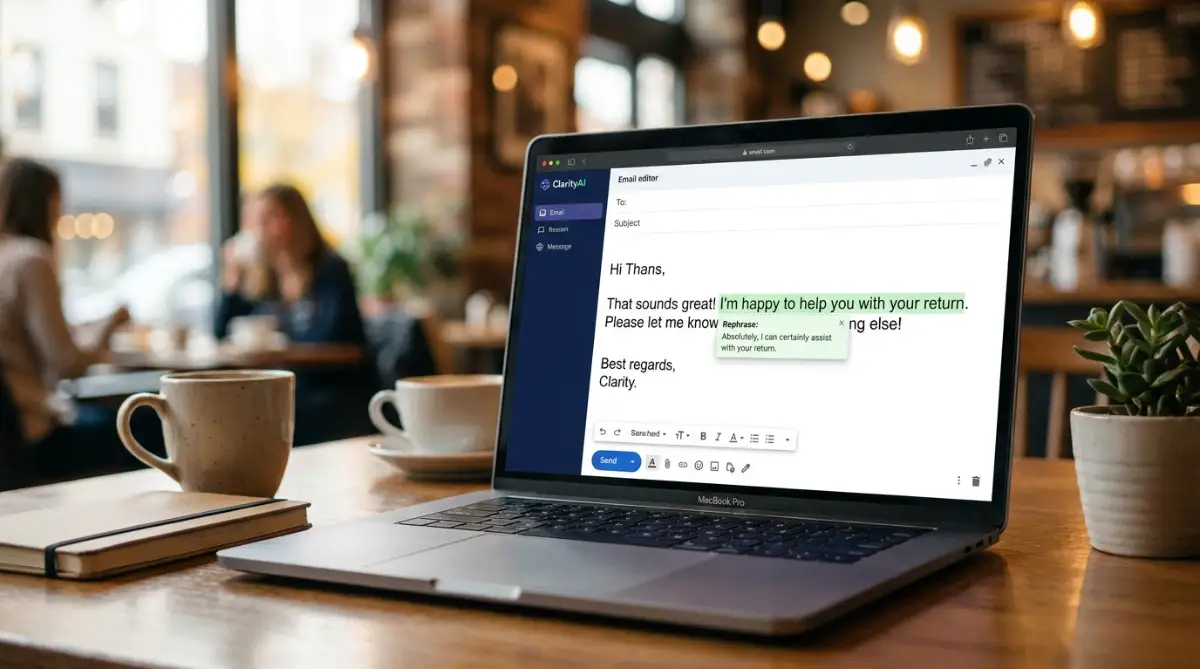
This cuts your response time from five minutes down to thirty seconds. When you multiply that by a hundred emails a day, you are saving hours of your life.
Data Patterns That Predict The Future
If you want to truly stop being overwhelmed, you need to stop reacting to problems and start predicting them. Smart algorithms are incredibly good at finding hidden patterns in large amounts of data.
Let us say you launch a new product on your website. Suddenly, your support inbox gets slightly busier. You might not notice the specific reason right away because you are just trying to keep your head above water.
A smart system will analyze thousands of incoming messages and give you a simple report. It might tell you that 40% of people are confused about the size chart on the new product page.
Fixing The Root Cause Once And For All
Now you have a clear action plan. You do not need to keep answering questions about the size chart. You just go to your website and make the size chart bigger and easier to read.
By fixing the root cause, you instantly stop hundreds of future emails from ever being sent. You are using data to solve the problem before it even happens.
This is the ultimate goal of bringing smart technology into your daily routine. It is not about being lazy. It is about working with purpose.
Reclaiming Your Time And Energy
We all have exactly twenty-four hours in a day. You cannot buy more time, but you can definitely stop wasting the time you have.
When you allow intelligent systems to handle the repetitive, boring, and predictable tasks, you give yourself a massive gift. You get your mental energy back.
You can finally close your laptop at a reasonable hour. You can spend time with your family without secretly checking your phone under the dinner table.
Your business will run smoother, your customers will get faster answers, and your support team will actually enjoy coming to work. They will feel like valued problem solvers, not mindless robots.
By taking these small, practical steps to automate the routine things, you build a stronger, healthier foundation for everything else you want to achieve. The technology is here, it is easy to use, and it is ready to help you take your life back
Beyond The Basics: Making Smart Algorithms Work For Your Team
Now that you understand how these tools can pull you out of the endless email nightmare, let us look at how the professionals actually run things. Setting up an automated system is just the beginning. The real magic happens when you know how to maintain it.
Think of an intelligent algorithm like a highly eager intern on their first day of work. They want to help you, but they do not know anything about your business yet. If you just throw them into a busy inbox and walk away, they will panic and make mistakes. You have to guide them properly.
Feeding Your Assistant The Right Ingredients
The absolute most important part of long-term success is the quality of the information you feed into the system. We call this training data. If you feed the computer outdated manuals, confusing policies, and messy spreadsheets, it will give your customers confusing answers.
Before you even turn the system on, you need to clean up your own house. You must create clear, simple, and updated answers for your most common questions. It is very similar to how you must prepare properly when you create your first digital product and sell it fast; without a solid and organized foundation, the final result will fall flat.
When a leading consultancy like McKinsey examines automation in customer operations, they constantly find that the most successful companies spend heavily on organizing their internal knowledge first. Clean data equals clean, helpful answers.
Designing A Warm, Approachable Personality
Many business owners make the mistake of letting their automated tools sound like cold calculators. Your customers are human beings, and they want to talk to something that at least sounds friendly.
You have the power to program a specific tone of voice into your tools. Use words like "please," "thank you," and "I understand." You can even add a tiny bit of humor if it fits your brand.
Instead of the system saying, "Error 404: Input Not Recognized," make it say, "Oops! I did not quite catch that. Could you say it in a different way so I can help?" This small shift in language makes a massive difference in how people react. They become much more forgiving and patient when the assistant is polite.
The "Human-In-The-Loop" Secret
Here is a secret that many software salespeople will not tell you: you should never fully remove humans from the process. The best automated systems in the world are designed to work right alongside your actual employees, not replace them.
When the algorithm gets confused by a strange question, it should instantly pause and alert a human worker. We call this the human-in-the-loop method. The computer handles the heavy lifting of gathering order numbers and account details, but the human makes the final decision on complex issues.
If you ignore this and force the machine to guess the answer, you will severely damage your relationship with your buyers. It is just like trying to stop persistent Wi-Fi drops in multi-story smart homes. If the connection between the router and the device is broken, the whole system becomes useless and highly frustrating. The human agent is that strong, unbreakable connection.
Teaching The System Through Gentle Corrections
Smart algorithms get smarter over time, but they need your feedback to grow. In the first few weeks of using these tools, you will need to monitor the conversations closely.
When the assistant gives a brilliant answer, you click a button to tell it that it did a great job. When it gives a slightly weird answer, you correct the text and show it the right way. This process is called reinforcement.
Every single time you correct the system, it learns the lesson permanently. It will never make that exact same mistake again. Over the span of a few months, your assistant becomes incredibly accurate.
Organizing A Central Knowledge Hub
To keep everything running smoothly for the long haul, you need one central place where all your company information lives. If your shipping policy changes, you should only have to update it in one single document.
The intelligent system will read that central document every day. The moment you change the shipping time from three days to five days, the assistant instantly starts telling customers the new timeline.
As reported in a recent Harvard Business Review analysis of customer service workflows, keeping a unified, single source of truth is the main reason why top-performing companies rarely give out incorrect information.
The Hidden Traps That Completely Ruin Automated Support
Even with the best intentions, I have seen so many brilliant business owners completely destroy their customer happiness by falling into a few very common traps. Implementing technology without empathy is a recipe for disaster.
Let us walk through the most dangerous mistakes people make, so you can easily avoid them.
Hiding The Escape Hatch From Your Customers
This is easily the most frustrating mistake you can make. We have all been there. You are stuck in a chat window with a robot that does not understand your problem.
You desperately type "talk to a human" over and over again, but the robot just keeps repeating the same useless menu options. Never, ever trap your buyers in an endless automated loop.
Always provide a clear, easy-to-find escape hatch. If the customer wants to speak to a real person, they should be able to press one button and instantly get in line for a human agent. If you try to hide your contact number or bury the human support option, you are telling your customers that their time does not matter. They will leave, and they will go to your competitor.
The "Set It And Forget It" Disaster
Technology is not magic. You cannot just turn it on, walk away, and expect it to run perfectly forever. Businesses change, products evolve, and customer needs shift constantly.
If you never audit your automated responses, the machine will eventually start giving outdated advice. Imagine a customer asking for help with a product you stopped selling six months ago, and the system cheerfully tells them it is in stock.
Ignoring system maintenance drains your brand's reputation, much like how bad charging habits are explained in the science of phone batteries where ignoring basic care ruins longevity. You must schedule time every single month to review the interactions and update the training materials.
Trying To Automate Highly Emotional Complaints
There is a time for efficiency, and there is a time for genuine human empathy. When a computer detects that a customer is furious, sad, or experiencing a major crisis, the automation must stop immediately.
If someone emails you saying their wedding dress arrived completely ruined just two days before their ceremony, the absolute worst thing you can do is send an automated reply saying, "Please check our FAQ page for return policies."
You need to set strict rules in your system. Any message containing highly emotional words or serious complaints must bypass the machine and go straight to a senior manager. Forbes regularly emphasizes in their AI customer experience insights that empathy cannot be faked by a machine. When a human is hurting, only another human can truly comfort them.
Failing To Prepare Your Real Employees
Sometimes, business leaders get so excited about new software that they forget to talk to their own staff. If you drop a massive new system on your support team without training them, they will feel threatened and confused.
They might think they are going to lose their jobs. You have to sit down with your team and explain that this tool is meant to be their assistant, not their replacement.
Show them how it will make their daily lives easier and remove the boring tasks they hate doing. When your team embraces the technology, the whole operation runs beautifully.
Your Blueprint For A Calmer Support Inbox
We have covered a lot of ground today, but the main message is extremely simple. You do not have to drown in repetitive emails anymore. The technology exists to lift that heavy weight off your shoulders, and it is easier to use than ever before.
By implementing smart sorting, setting up instant helpful replies, and using tools to read the mood of your buyers, you are doing everyone a favor. Your customers get the rapid answers they crave, and you get your peace of mind back.
Taking The First Step Tomorrow Morning
You do not need to overhaul your entire business overnight. That will just cause more stress. Instead, start incredibly small. Tomorrow morning, take a look at your inbox and identify the top three questions you get asked every single day.
Just take those three questions and build a simple automated response for them. Once you see how well that works, you will gain the confidence to automate a few more things next week.
When you finally clear your schedule of these robotic tasks, you open up incredible new opportunities. You might finally have the time to start a writing business without prior experience or launch that creative project you have been dreaming about for months. The goal of saving time is to spend it on things that actually bring you joy and growth.
People Also Ask About Smart Support Systems
Will intelligent algorithms completely replace my human support team?
Absolutely not. These tools are designed to handle the simple, repetitive questions like password resets and shipping updates. By removing the boring tasks, your human team can actually spend more time solving complex problems and having meaningful conversations with your buyers.
Do I need a massive budget to start automating my inbox?
No, you really do not. There are many affordable, beginner-friendly tools built specifically for small businesses that cost just a few dollars a month. You can start with basic email sorting and simple chat replies without needing to hire an expensive software developer.
How long does it take to train an automated assistant?
If you already have a clear list of frequently asked questions, you can set up a basic assistant in just a single afternoon. However, to make it truly smart and highly accurate, you should plan to spend a few minutes each week correcting its mistakes over the first two months.
Can these systems understand bad grammar or spelling mistakes?
Yes, modern algorithms are incredibly smart when it comes to messy language. They do not just look for exact word matches; they look for the overall meaning behind the sentence. So if a customer types "whre is my odrer," the system will still completely understand that they are asking for shipping details.
Can small businesses actually benefit from these advanced tools?
Small businesses often benefit the most because they do not have the money to hire dozens of support agents. Using a smart digital assistant allows a one-person business to provide the same lightning-fast customer service as a massive global company.
A Personal Thought Before You Go
I spent way too many nights feeling totally burned out by my own inbox before I finally embraced these tools. My biggest regret is simply that I did not start using them sooner. Take that small step today to organize your workflow, and I promise you will feel a massive sense of relief when you finally get your time back.
Disclaimer: This article is for informational and educational purposes only. The strategies and tools discussed may vary based on individual business needs and software updates. Always review the privacy policies and data handling rules of any third-party software before integrating them into your customer service workflow. We are not responsible for any direct or indirect business outcomes resulting from the implementation of these tips.