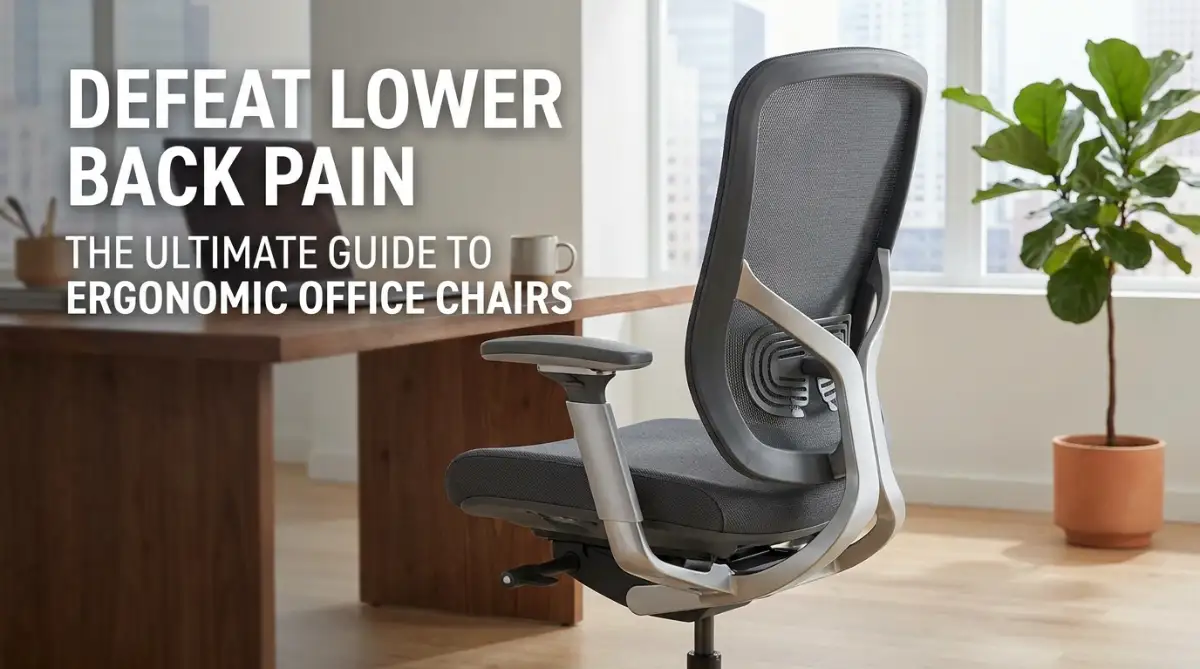
The Silent Workspace Enemy: How My Desk Chair Broke My Spine
I remember the exact afternoon my lower back finally gave out. I was sitting at my cheap home office desk, typing away on a tight deadline, when a sharp, burning pain shot directly up my spine. It felt like a hot needle was being pressed deep into my lower back, and I had to slide onto the carpet just to catch my breath.
That was the exact moment I realized my basic, unsupportive office chair was slowly destroying my health. I spent the next few months researching, testing, and talking to physical therapists to find a real solution. Today, I want to share the exact features that saved my back so you do not have to go through the same agony.
Many people do not realize how much a bad chair impacts their daily mood and focus. You sit down in the morning feeling great, but within an hour, you are already slouching and twisting to find a painless position. Your focus completely shifts from doing your job to managing the throbbing ache in your lumbar spine.
This daily struggle does not just stay at your desk either. By the time you log off, your back is so stiff that you cannot even bend down to play with your kids or enjoy a simple walk. It drains your energy and makes you feel much older than you actually are.
Over the years, I have spoken to dozens of colleagues who thought back pain was just a normal part of working an office job. They buy cheap cushions or try to stand all day, but nothing seems to give them lasting relief. The truth is, your spine needs very specific mechanical support to stay happy during long sitting sessions.
Once you understand what to look for, you can easily find a chair that keeps you pain-free and energized all day. Let us break down the exact features that make a massive difference for your lower back.
The Anatomy of Support: Why Your Lumbar Spine Needs Custom Care
When you sit down, your lower spine naturally wants to curve inward in a shape called lordosis. A standard office chair forces your back to flatten out, which puts massive pressure on your spinal discs. Over time, this constant pressure leads to muscle fatigue, stiffness, and severe disc pain.
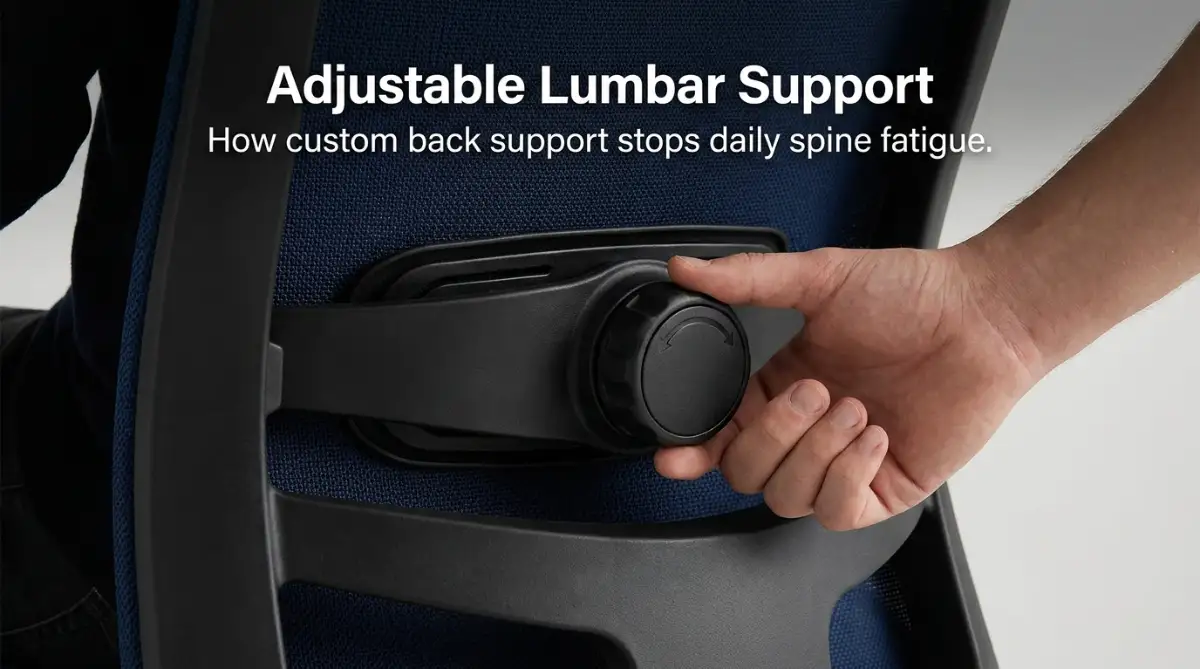
To prevent this, you must look for a chair with excellent adjustable lumbar support. This is not just a fancy pad that sits against your back; it is a system that mimics the natural curve of your spine. Let us explore the different types of support systems you will find.
Many basic chairs offer lumbar support, but it sits in a fixed position. Because everyone has a different height and torso length, a fixed support bar will likely push against the wrong part of your spine.
You need a chair that lets you slide the lumbar support up and down. This ensures the curve fits perfectly into the small of your lower back.
Even better is depth adjustability, which controls how hard the chair pushes against your back. Some days you might want a gentle hug, while other days you might need firm support to keep you upright.
Some modern ergonomic chairs feature dynamic lumbar support. These systems automatically adjust their shape and tension as you shift your weight or lean back.
This is incredibly helpful because humans are not meant to sit completely still. A dynamic backrest moves with you, keeping your spine supported even when you reach for a pen or twist to look at a second monitor.
The Seat Pan: Protecting Your Hips and Thighs
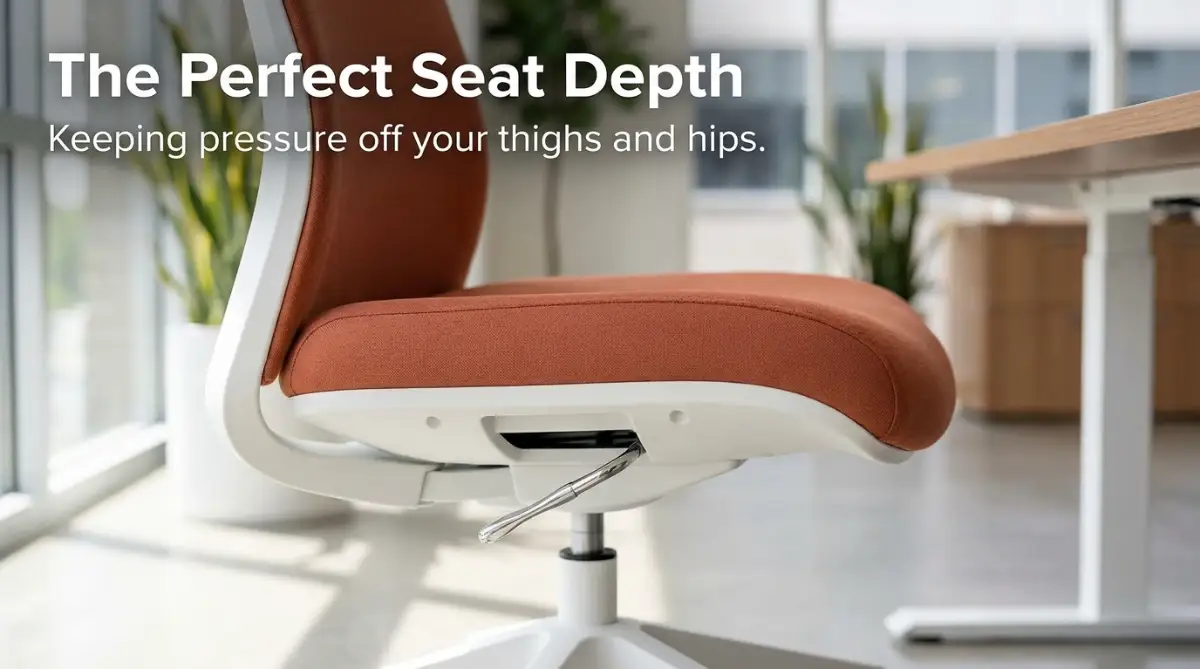
While most people focus only on the backrest, the seat cushion plays a massive role in lower back pain. If your seat is too deep, you will not be able to sit all the way back to use the lumbar support. If it is too shallow, your thighs will hang off the edge, putting extra stress on your hips.
To fix this, look for a chair with an adjustable seat pan. This feature lets you slide the seat cushion forward and backward while keeping the backrest in place.
A great way to test this is the three-finger rule. When sitting all the way back, there should be a small gap about the width of three fingers between the back of your knees and the front of the seat.
This gap keeps the seat from cutting off blood circulation in your legs. It also prevents you from sliding forward, which is the main cause of slouching and lower back strain.
The front edge of your seat cushion should slope downward like a waterfall. A sharp, square edge acts like a clamp on the back of your knees.
This pressure compresses your sciatic nerve, leading to numbness and radiating pain that travels up into your lower back. A rounded waterfall edge keeps your blood flowing freely and keeps your legs feeling light.
Recline and Tension: Keeping Your Spine in Motion
One of the biggest mistakes office workers make is locking their chair in a perfectly upright, 90-degree angle. This position actually puts the highest amount of pressure on your lumbar discs.
Physical therapists recommend sitting at a slight recline of about 100 to 110 degrees. This angle distributes your body weight more evenly across the chair and takes the load off your lower back.
A high-quality ergonomic chair should have a tension knob beneath the seat. This knob adjusts how much force is required to push the backrest backward.
If the tension is too loose, you will feel like you are falling backward every time you lean back. If it is too tight, you will have to fight the chair just to get a comfortable angle.
You want to adjust it so you can gently lean back with minimal effort, allowing your muscles to relax.
Once you find your perfect angle, you should be able to lock it in place. A multi-position tilt lock is a highly useful feature to look for.
It lets you lock the chair in an upright position for intense typing sessions. Then, you can easily unlock it to recline slightly during a phone call or online meeting.
Experiencing how these moving adjustments work in a real setup is highly helpful. Watch this expert video to see exactly how to set up your chair angles for maximum lower back relief.
[Insert YouTube Video Link Here]
Adjustable Armrests: The Hidden Key to Neck and Shoulder Relief
You might wonder how armrests connect to your lower back. The weight of your arms is surprisingly heavy, and if they are not supported, your shoulders will pull downward.
This downward pull strains your upper back and neck, which eventually travels down your spine to your lower back. Adjustable armrests hold that weight so your shoulder and back muscles do not have to do all the heavy lifting.
Basic chairs only allow you to adjust armrests up and down. While this is helpful, look for 3D or 4D armrests for the best ergonomic setup.
These armrests can slide forward, backward, side to side, and even pivot inward. Pivoting is especially useful when you are typing on a keyboard, as it supports your forearms closely.
To set your armrests correctly, relax your shoulders and bend your elbows at a 90-degree angle. Slide the armrests up until they just lightly touch the bottom of your elbows.
They should never push your shoulders upward or force you to hunch over. Your arms should feel completely supported and light as you type.
Material and Breathability: Why Mesh Wins for All-Day Comfort
The material of your chair does more than just look nice; it affects how comfortable your muscles stay over long hours. Traditional leather chairs look beautiful, but they trap body heat and moisture very quickly.
As your body warms up, you start to sweat, which makes you slide around on the seat. This subtle sliding ruins your posture and causes you to slouch forward.
A high-quality mesh backrest allows air to flow freely, keeping your skin cool and dry. This breathability helps you stay in the correct sitting position for much longer periods.
If you prefer a fabric seat cushion, pay close attention to the foam density. Cheap chairs use soft, low-density foam that feels great for the first ten minutes but sinks completely after a month.
Once the foam bottoms out, you are essentially sitting on hard plastic or metal. Look for high-density, molded foam that holds its shape and supports your pelvic bones.
My own journey taught me that soft does not mean supportive. I used to think a super soft cushion would save my back, so I bought a thick gel pad. It actually made my posture worse because my hips kept sliding around. Real support comes from a firm, shaped seat pan rather than a mushy pillow.
Making Your Decision: A Quick Checklist
When you search for your next office chair, keep these key points in mind to protect your body. Try to test a chair in person if possible, or look for companies that offer a solid trial period.
- Check the lumbar range: Ensure the support hits your lower back, not your upper hips.
- Test the seat glide: Make sure you can adjust the depth to fit your leg length.
- Feel the foam density: It should feel firm and hold your weight without sinking to the base.
- Verify the armrest range: They should adjust easily to support your arms at a relaxed angle.
By focusing on these specific features, you will find a chair that keeps you comfortable, focused, and free from pain throughout your workday. Your back will thank you for making the switch to proper ergonomic support.
Beyond the Basics: Expert Secrets for Long-Term Spinal Health
Once you have set up your office chair with the perfect lumbar support and seat depth, you might think your job is done. However, keeping your spine pain-free over many years requires a few advanced habits that most people completely ignore. Having a high-quality seat is only the first step to maintaining a healthy back.
To get the most out of your setup, you need to understand the concept of dynamic sitting. This means you should never lock your body into one rigid position for hours at a time, no matter how comfortable it feels initially. Instead, you must allow your body to make micro-movements throughout your working hours.
Just like a buyer needs to carefully study how to spot house-wrecking structural flaws at an open house before making a massive purchase, you must inspect the structural build and flexibility of your chair. A good ergonomic setup should adapt to your weight shifts instead of forcing you to stay frozen in one angle.
Many occupational health experts suggest utilizing the active sitting method to keep your core engaged. To do this, try leaving your chair backrest unlocked for at least one hour in the morning and one hour in the afternoon. This subtle change forces your deep core muscles to stabilize your spine, which keeps them from becoming weak and lazy.
You can also find professional advice on proper seating heights from the Mayo Clinic Office Ergonomics Guide to ensure your joints remain stress-free[1]. Adjusting your seat so your knees are slightly lower than your hips is a great way to relieve pressure on your lower spine[2]. This simple tilt keeps your pelvis from rolling backward, which is the primary trigger for lower back fatigue.
Buying a premium office chair without checking its adjustment ranges is like navigating your first home appraisal and handling a low valuation without doing your homework. You must know your body's unique measurements so you can align the chair to your frame perfectly.
Another useful secret is to perform a weekly check of your chair's various tension settings. Over time, the internal springs and lock levers can loosen up due to daily use, causing the chair to sag. Taking two minutes every Monday morning to tighten the knobs and reset your custom levels ensures you get continuous support.
On top of that, you should pair your seat adjustments with simple desk stretches that you can do without leaving your office. A quick seated torso twist or a gentle neck roll can instantly release built-up muscle tension. These tiny movements keep your blood flowing properly and help your spinal discs absorb the nutrients they need to stay healthy.
To protect your back for the long haul, you must also look at your desk space as a complete system. If your keyboard is too far away, you will naturally lean forward and pull your back away from the lumbar support. Keep your mouse and keyboard close to your body so your elbows can stay relaxed at your sides.
The Hidden Traps: Pitfalls That Turn Good Chairs Into Pain Generators
When your lower back starts hurting, it means your spine's load-bearing system has been overloaded by stress. Think of it like a database team resolving sudden performance bottlenecks in large-scale database management systems to keep a heavy application running smoothly. If you ignore the main source of the physical strain, your entire system will eventually break down under the pressure.
One of the biggest mistakes people make is choosing a chair based purely on how beautiful it looks in a catalog. Sleek, minimalist designs might look great in a home office, but they often lack the adjustable parts needed to save your spine. Do not trade your physical health for a trendy piece of furniture that does not support your lower back.
Another major pitfall is adding cheap aftermarket cushions to a highly engineered ergonomic chair. These thick pads often push your hips too far forward, which completely ruins the built-in lumbar alignment. If your chair is selected correctly, you should never need to add extra pillows or support straps to feel comfortable.
You should also check the official OSHA Computer Workstations eTool to understand how poor posture damages your musculoskeletal system over time[3][4]. Many workers buy an expensive chair but still suffer from pain because they place their computer screens too low[5]. This forces them to crane their necks downward, which pulls the entire spine out of its safe alignment[5].
Understanding the pain signals your body sends out is just as complex as learning how language models understand us through deep data analysis. Your lower back pain is a warning system telling you that your posture needs immediate correction. Ignoring this warning can lead to permanent damage, such as herniated discs or severe chronic sciatica.
You must also avoid the temptation of sitting in the exact same position all day long, even if it is a highly supportive one. The human body is built for natural movement, and staying static for eight hours cuts off blood circulation to your muscles. Make it a strict habit to stand up and walk around for at least two minutes every single hour.
Lastly, do not fall into the trap of thinking a great chair completely replaces the need for physical exercise. No piece of furniture can protect a back that has weak core muscles and tight hamstrings. To get the best results, combine your ergonomic chair with regular core-strengthening exercises like planks and bird-dogs.
Step Into a Pain-Free and Comfortable Tomorrow
Investing in a proper ergonomic office chair is one of the most important decisions you can make for your physical health. When you choose a seat with adjustable lumbar support, seat depth, and customizable armrests, you are protecting your spine from years of wear and tear. This simple upgrade will not only remove your daily physical pain but will also help you regain your energy and work focus.
Your journey to a healthier back does not have to be difficult or overwhelming. By focusing on the scientific features we discussed today, you can easily filter out the bad chairs and find the perfect match for your body. Remember to set up your desk as a complete system where your chair, screen, and keyboard work together to support you.
I spent years hurting my back on cheap office chairs before I finally took my posture seriously. Making the change to a supportive, adjustable chair completely transformed my workday and gave me my active life back. I encourage you to take action today and stop letting a bad chair steal your comfort and happiness.
Common Questions on Choosing and Adjusting Your Office Chair
You do not need to constantly fiddle with your settings, but you should adjust your recline angle and armrest height at least two to three times a day. This slight shifting of positions redistributes the physical load on your spine and prevents muscle fatigue. It is especially helpful to unlock your backrest during virtual meetings to allow for natural movement.
A headrest does not directly support your lower spine, but it helps keep your neck and upper shoulders aligned. When your neck is supported, you are far less likely to lean forward and pull your lower back away from the lumbar cushion. If you like to recline while reading or talking on the phone, a headrest is a highly useful feature to have.
Yes, a poorly designed chair can compress your sciatic nerve, which runs from your lower back down through your hips and legs. This compression often causes a dull ache, numbness, or a tingling feeling in your thighs and calves. Using a chair with a rounded waterfall edge and proper seat depth will instantly relieve this pressure.
If your desk is too high, you will be forced to raise your shoulders or reach upward to type, which strains your upper back. If the desk is too low, you will slouch forward and pull your spine away from your chair's lumbar support. Your desk should sit at a height that allows your elbows to bend at a relaxed ninety-degree angle while typing.
Disclaimer
The information provided in this article is for educational and informational purposes only and should not be taken as professional medical advice. If you suffer from chronic, severe, or worsening lower back pain, please consult with a qualified physician or physical therapist. The suggestions in this guide are meant to help improve workplace comfort but may not treat underlying medical conditions.
![5 Hidden Energy Mistakes Your Kitchen Appliances Make (And How to Fix Them) [Save Money]](https://vimex24.com/storage/uploads/blogs/1785732023_5-hidden-energy-mistakes-your-kitchen-appliances-make-and-how-to-fix-them-save-money.webp)